
Choose a category, set an item-price limit, compare a few relevant finds and save the ones worth checking. Open View product details to confirm the full record before making a purchase through your chosen buying platform.
Start with a specific search
Search for the product type or model you want. A query such as “running shoes” is easier to work with than a general search for a brand. Use a category filter to remove unrelated products, then set a reference-price limit if you have a budget.
Compare the same thing
Check the model, colour, number of pieces and available options. A low starting price might refer to an accessory or a different variant. A product title is a starting point, not confirmation that every option pictured is included.
Keep product price and total cost separate
The USD figures in this directory are indicative conversions. They do not include domestic delivery, international shipping, payment charges or destination-specific import costs. Keep room in your budget for the costs that are still unknown.
Check what the photos can establish
Product images show how an item is presented. Warehouse QC photos, where available on the destination, may show an individual item more closely. Compare photos with the exact listing and variant; a picture of a similar item does not establish the condition of yours.
Open the complete product record
Use the corresponding external product link to inspect the available details. Our directory does not take payment, place Hoobuy orders or confirm stock. If a source shopping link is unavailable, do not assume an external product page is a Hoobuy checkout link.
Make a shortlist you can verify
Save the exact listing and your preferred size or variant. Before paying through a buying platform, review its current fees, cancellation rules and shipping quote. The directory and the live listing can change at different times.
Try it on this directory
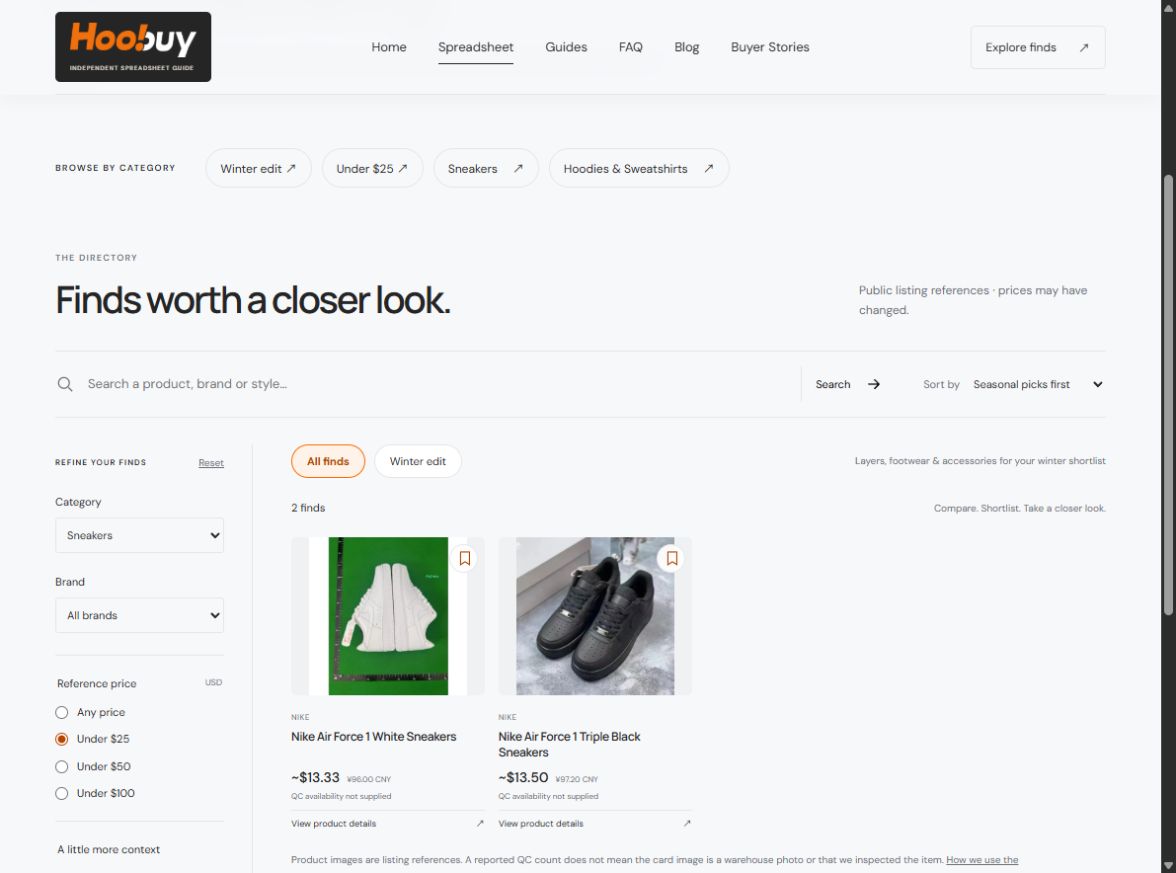
- Open the directory and choose Sneakers under Category.
- Choose Under $25 under Reference price. This caps the estimated item price, not delivery cost.
- Use the bookmark button on a card to save it on this browser. Turn on My saved finds to return to your shortlist.
- Select View product details on the exact card. This opens an external product record, not an order placed by this website.
Before you continue
- The title, colour and model describe the same item you want.
- The reference price is within your item budget; delivery is still separate.
- You have checked the exact size or variant on the destination.
- The saved item is a candidate, not a stock or quality confirmation.
A common mistake
If a filter returns no results, use Reset or remove a condition. QC references reported requires supplied photo-count data; an empty result does not mean every product has been inspected and failed.
Scope: general selection guidance and our actual directory interface. The worked examples are not stock, price or physical-item checks. Exact platform fees, services and deadlines must be checked on the current buying platform. Read our data approach.